
The Complete Guide & Pricing Template for Renting a Backyard Movie Kit: How to Set Rates, Build Packages, and Maximize Profit
Introduction
This guide provides an authoritative overview of how to create, price, and operate a backyard movie rental business. Readers will learn how to assess market demand, select reliable equipment, design attractive service packages, and calculate rates that generate profit while remaining competitive. The content balances strategic planning with practical product recommendations, ensuring that even newcomers can launch a successful venture.
Background and Context
Outdoor entertainment has experienced rapid growth as families and communities seek safe, socially distanced activities. A backyard movie kit typically includes a projector, a screen, and audio equipment, all of which must deliver high‑definition visuals and clear sound in varying lighting conditions. Understanding the technical specifications of each component is essential for delivering a professional experience that justifies premium pricing.
Key concepts include lumens (brightness), resolution, contrast ratio, and connectivity options. Lumens measure the amount of light a projector emits; values above 3,000 are generally required for daytime use, while lower values suffice for evening screenings. Native 1080P resolution ensures crisp images, and a high contrast ratio enhances detail in dark scenes. Wireless connectivity such as dual‑band Wi‑Fi and Bluetooth simplifies setup and reduces cable clutter.
Equipment Selection and Recommendations
Choosing equipment that balances performance, durability, and cost is the cornerstone of a profitable rental service. The following products have been evaluated based on specifications, customer ratings, and suitability for outdoor use.
Projector Options
The first essential component is a reliable projector. Two models are highlighted:
- Roconia 1080P WiFi Bluetooth Projector – Offers dual‑band 2.4G/5G Wi‑Fi, 18,000 lumens, native 1080P resolution, and built‑in Hi‑Fi speakers. It receives a 4.4‑star rating from over 1,200 reviewers.
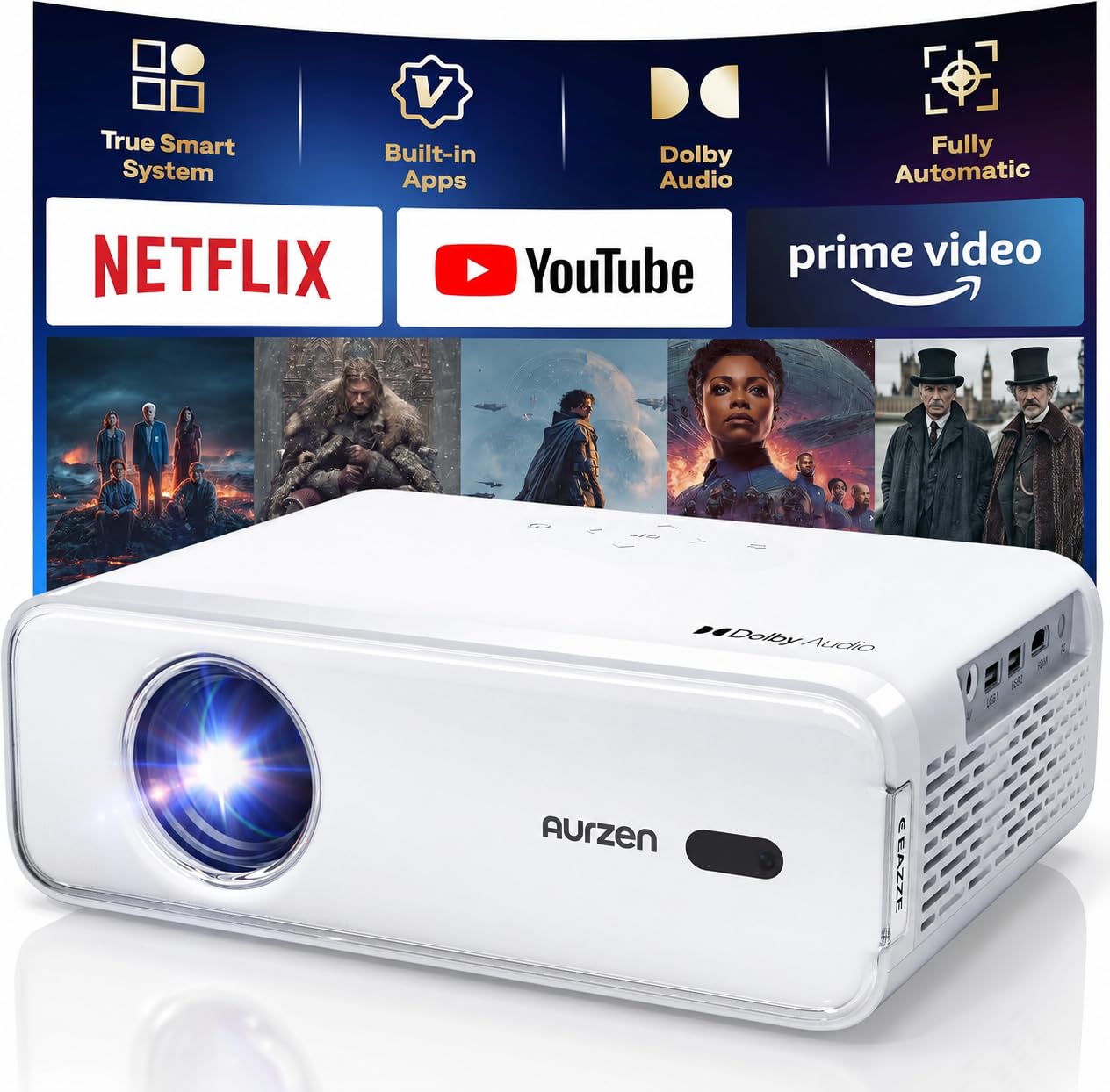
- Aurzen EAZZE D1 Smart Projector – Features a built‑in smart TV operating system, HDR10, dual 8W speakers, and automatic focus and keystone correction. It holds a 4.3‑star rating from more than 4,400 reviewers.
Both projectors support 5G Wi‑Fi for low‑latency streaming, but the Roconia model provides a higher lumen output, making it more suitable for daylight or partially shaded environments. The Aurzen model excels in ease of use due to its integrated smart OS and auto‑focus capabilities.
Screen Option
The visual surface must complement the projector’s brightness and resolution. The recommended screen is:
- XHYCPY 16ft Inflatable Movie Screen – Provides front and rear projection, a 160° viewing angle, and rapid inflation within two minutes. It is rated 4.6 stars by more than 2,100 customers.
This inflatable screen is lightweight, portable, and capable of supporting both front and rear projection, which adds flexibility for various venue layouts.
Audio Considerations
While both projectors include built‑in speakers, supplemental audio can dramatically improve the cinematic experience. The Roconia projector’s 5.1‑channel Bluetooth connectivity enables pairing with external soundbars or portable PA systems. The Aurzen projector’s dual 8W speakers deliver Dolby‑enhanced sound, but adding a Bluetooth‑enabled speaker can provide the volume needed for larger outdoor audiences.
Comparison and Selection Guide
| Feature | Roconia 1080P WiFi Bluetooth Projector | Aurzen EAZZE D1 Smart Projector |
|---|---|---|
| Resolution | Native 1080P (1920×1080) | Native 1080P (1920×1080) |
| Brightness | 18,000 lumens | Not specified (suitable for low‑light) |
| Contrast Ratio | 10,000:1 | Not specified |
| Wi‑Fi | Dual‑band 2.4G/5G | Dual‑band 2.4G/5G |
| Bluetooth | 5.1 (audio only) | 5.1 (audio only) |
| Built‑in Speakers | Dual Hi‑Fi stereo | Dual 8W Dolby speakers |
| Auto Focus/Keystone | No | Yes (auto focus, auto keystone ±15°) |
| Ports | HDMI×2, USB×2, AV, VGA, 3.5mm | HDMI, USB, AV, 3.5mm |
| Customer Rating | 4.4/5 (1,213 reviews) | 4.3/5 (4,415 reviews) |
When selecting a projector for a rental kit, consider the typical lighting conditions of the target market. For daytime community events, the higher lumen output of the Roconia model is advantageous. For evening private parties, the Aurzen model’s auto‑focus and smart OS simplify setup and reduce the need for external streaming devices.
Pricing Template and Rate Setting
Profitability hinges on accurate cost accounting and competitive pricing. The following template outlines the primary cost categories and suggested markup percentages.
- Equipment Depreciation: Estimate a useful life of 24 months for each unit. Divide the purchase price by 24 to obtain a monthly depreciation cost.
- Maintenance and Consumables: Allocate $5–$10 per rental for lamp replacement (if applicable), cleaning supplies, and minor repairs.
- Transportation: Include fuel, vehicle wear, and driver time. A flat fee of $15 per event is reasonable for local deliveries.
- Labor: Charge for setup, calibration, and teardown. Typical rates range from $30 to $50 per hour; a 2‑hour service window equals $60–$100.
- Insurance: Protect against loss or damage with a per‑event insurance fee of $10–$20.
- Profit Margin: Apply a 30‑40% markup on the sum of the above costs to achieve a healthy profit.
Example calculation for a weekend family package using the Roconia projector and XHYCPY screen:
- Purchase price (projector): $299
- Purchase price (screen): $199
- Monthly depreciation (projector): $12.50
- Monthly depreciation (screen): $8.30
- Combined monthly depreciation: $20.80
- Maintenance per event: $8
- Transportation: $15
- Labor (2 hours): $80
- Insurance: $15
- Total cost before profit: $138.80
- Applying 35% profit margin: $188.40
Rounding to a market‑friendly price, the package could be offered at $190 per night. Additional add‑ons such as popcorn machines, extra speakers, or themed lighting can be priced separately.
Best Practices and Operational Tips
- Standardize Setup Procedures: Create a checklist that includes screen inflation, projector placement, focus adjustment, and audio testing. Consistency reduces setup time and minimizes errors.
- Offer Tiered Packages: Provide basic, premium, and deluxe options. Basic packages include the projector and screen; premium adds external speakers and a portable power station; deluxe incorporates themed décor and concession items.
- Maintain an Inventory Log: Track serial numbers, purchase dates, and maintenance history. This data supports depreciation calculations and warranty claims.
- Implement Online Booking: Use a scheduling platform that collects deposits, confirms dates, and sends automated reminders. Secure deposits protect against last‑minute cancellations.
- Educate Customers: Provide a short user guide that explains how to operate the projector, adjust volume, and troubleshoot common issues. Well‑informed clients are more likely to leave positive reviews.
- Leverage Seasonal Demand: Promote family packages during school holidays, romantic setups for summer evenings, and corporate team‑building events in the fall.
Frequently Asked Questions
- What is the minimum space required for a 100‑inch image?
- For a 100‑inch diagonal image with a 16:9 aspect ratio, the projector should be placed 8–10 feet away, depending on the lens throw ratio. Both highlighted projectors support flexible throw distances.
- Can the inflatable screen be used indoors?
- Yes, the screen can be set up indoors, but the blower must remain powered to maintain inflation. The screen’s polyester material is lightweight and does not produce excessive noise.
- Do I need a separate sound system?
- The built‑in speakers of the Roconia and Aurzen models are adequate for small gatherings of up to 30 guests. For larger audiences, pairing the projector with a Bluetooth‑enabled soundbar or portable PA system is recommended.
- How often should the projector lamp be replaced?
- Both projectors use LED technology with a claimed lifespan of up to 100,000 hours, which typically exceeds the useful life of a rental business. Regular cleaning of the lens and ventilation grilles ensures optimal performance.
- Is Wi‑Fi connectivity reliable in outdoor settings?
- Dual‑band 5G Wi‑Fi provides a stable connection when a mobile hotspot or portable router is positioned within 30 feet of the equipment. Avoid placing the router behind large metal objects or dense foliage.
Conclusion
Renting a backyard movie kit can be a lucrative venture when the operator combines sound business fundamentals with high‑quality equipment. By selecting a projector that matches the lighting conditions, pairing it with a versatile inflatable screen, and applying a transparent pricing template, entrepreneurs can deliver memorable cinematic experiences while achieving healthy profit margins. Continuous refinement of packages, attentive customer service, and diligent equipment maintenance will sustain growth and reputation in this emerging market.
Products Featured in This Guide
Roconia 1080P WiFi Bluetooth Projector
Price: Not listed (Amazon listing) – Rating: 4.4/5 (1,213 reviews)
Featured for its high 18,000‑lumens output, dual‑band Wi‑Fi, and built‑in Hi‑Fi speakers, making it ideal for daytime and evening outdoor screenings.
Aurzen EAZZE D1 Smart Projector
Price: $99.99 – Rating: 4.3/5 (4,415 reviews)
Featured for its integrated smart TV operating system, auto‑focus and keystone correction, and HDR10 support, providing a plug‑and‑play solution for evening events.
XHYCPY 16ft Inflatable Movie Screen
Price: $98.99 – Rating: 4.6/5 (2,105 reviews)
Featured for its rapid two‑minute inflation, front and rear projection capability, and durable 210D oxford frame, offering flexibility for varied outdoor venues.
![Projector with 5G WiFi and Bluetooth, Native 1080P Projector[Projector Screen Included], Full HD 18000LM Movie Projector, 100" Display Home Theater, Compatible with Phone/Laptop/TV Stick](https://m.media-amazon.com/images/I/819svSUqDML.jpg)