Introduction
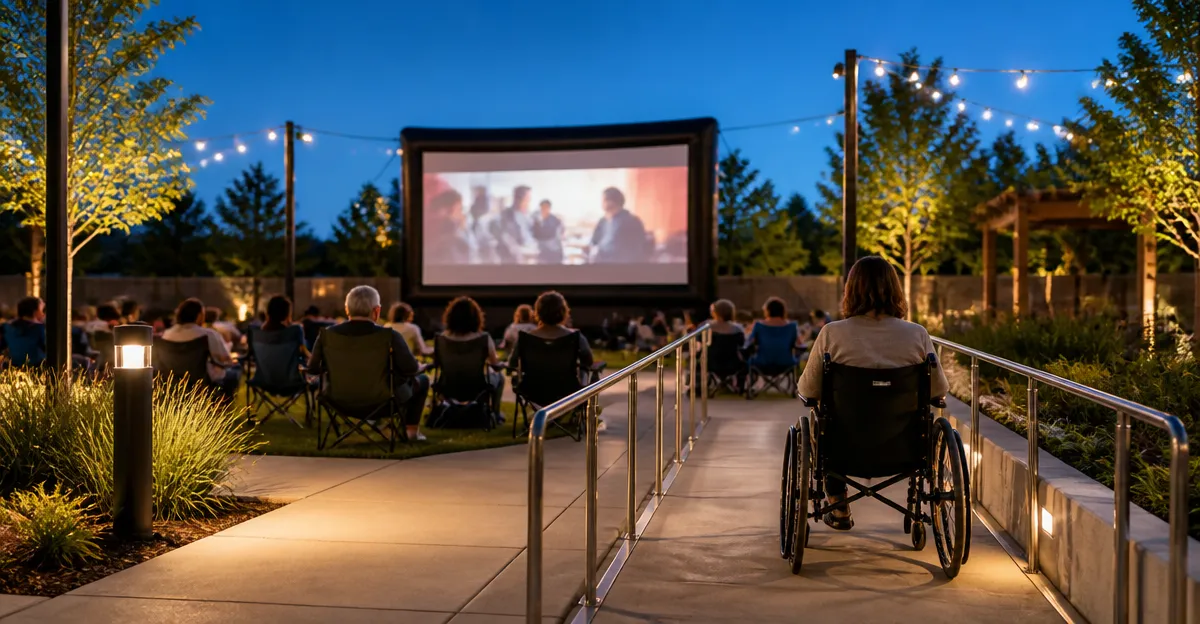
Hosting an outdoor movie night can transform a simple gathering into a memorable community event. When the event is designed to be accessible, it welcomes individuals of all abilities and demonstrates a commitment to inclusion. This guide explains the essential components of an ADA‑compliant outdoor cinema, including seating arrangements, audio accommodations, captioning solutions, and product recommendations that enhance the viewing experience while meeting legal standards. Readers will learn how to evaluate venues, select appropriate equipment, and apply best‑practice tips that ensure every guest can enjoy the program without barriers.
The guide is organized into clear sections that progress from background knowledge to actionable recommendations. Each product suggestion is linked to a reputable Amazon listing, and the features, specifications, and customer ratings are presented to support informed decisions. By following the checklist and recommendations, organizers will be able to plan an event that satisfies both the spirit of entertainment and the requirements of the Americans with Disabilities Act.
Background and Context
The Americans with Disabilities Act (ADA) establishes design standards for public accommodations, including temporary outdoor events. Key requirements address accessible routes, usable seating, effective communication, and safe egress. For outdoor movie nights, the most common barriers involve uneven terrain, lack of designated wheelchair spaces, insufficient audio reinforcement for the hearing impaired, and the absence of captioning for individuals who are deaf or hard of hearing.
In addition to legal compliance, accessibility improves the overall quality of the event. Research indicates that inclusive design increases attendee satisfaction, encourages repeat participation, and expands the potential audience. Therefore, organizers should treat accessibility as a core element of event planning rather than an afterthought.
Technology has simplified the implementation of accessible features. Modern inflatable projection screens provide large, high‑contrast images that are easier to read, while portable audio systems and captioning devices can be integrated without extensive wiring. The following sections describe how to combine these tools with practical site‑planning strategies.
Site Planning and Accessible Seating
Before any equipment is purchased, the venue must be evaluated for compliance with ADA pathways. A clear, at‑least‑36‑inch wide route should lead from parking to the viewing area, with firm, stable surfaces that can support wheelchairs. Temporary ramps may be required if the ground is sloped.
Seating should include a mix of standard chairs and designated wheelchair spaces. The wheelchair spaces must be positioned so that the viewer’s line of sight is comparable to that of seated guests. A common rule is to provide a clear view of at least the lower third of the screen. When using an inflatable screen, the height of the image can be adjusted by inflating the screen to the desired tension, which helps maintain an optimal sight line for wheelchair users.
For added comfort, consider providing portable footrests and armrests that are removable for wheelchair users. If the event is expected to draw a large crowd, allocate a minimum of one wheelchair space for every 12 seats, as recommended by ADA guidelines.
Product Recommendation: The XHYCPY 16ft Inflatable Projector Screen offers a 16‑foot diagonal display with a 160° viewing angle, making it suitable for medium‑size gatherings where wheelchair users need an unobstructed view. Its quick‑inflate blower and sturdy 210D oxford frame ensure the screen remains taut, reducing the risk of visual distortion for all viewers.
Audio Accessibility
Clear audio is essential for individuals with hearing loss, but many outdoor venues suffer from ambient noise and wind interference. The most reliable solution is a wireless assistive listening system (ALS) that transmits the audio directly to personal receivers or Bluetooth‑enabled hearing aids.
When selecting an ALS, prioritize systems with a range of at least 300 feet, multiple channels for simultaneous translation, and rechargeable batteries. The transmitter should be placed near the projector’s audio output to minimize latency.
In addition to ALS, a high‑quality portable speaker system can amplify ambient sound for guests without hearing devices. Look for speakers with a wide frequency response and built‑in wind screens.
Product Recommendation: The XHYCPY 20ft Inflatable Projector Screen provides a larger viewing surface for larger audiences, and its reinforced frame can support the weight of an external speaker mount if needed. The 250 W blower operates quietly, allowing the ALS audio to remain the dominant sound source.
Captioning and Visual Communication
Providing real‑time captions ensures that deaf or hard‑of‑hearing guests can follow dialogue and narrative cues. Two primary methods are available: closed‑captioning via a separate display device and open captioning projected directly onto the screen.
Closed‑captioning devices connect to the video source and display subtitles on a tablet or dedicated captioning monitor placed within view of the audience. Open captioning involves a secondary projector that overlays captions onto the main image; this method is useful when guests are dispersed across a wide area.
When using an open‑caption system, the projection screen must have a high gain surface to maintain brightness. A matte white screen with low light diffusion is ideal because it reduces glare while preserving caption legibility.
Product Recommendation: The TOWOND 150in Projector Screen with Stand offers a portable stand and a wrinkle‑free surface that maintains consistent brightness, which is advantageous for overlaying captions. Its 160° viewing angle and 4K HD compatibility ensure that both the movie image and captions remain clear under varying lighting conditions.
Comparison and Selection Guide
| Feature | XHYCPY 16ft | XHYCPY 20ft | TOWOND 150in | GYUEM 20ft | STWUI 120in |
|---|---|---|---|---|---|
| Screen Size (Diagonal) | 16 ft | 20 ft | 150 in (12.5 ft) | 20 ft | 120 in (10 ft) |
| Projection Type | Front/Rear | Front/Rear | Front/Rear | Front/Rear | Front/Rear |
| Material | Thickened polyester, 210D oxford frame | Thickened polyester, 210D oxford frame | Natural polyester fiber, anti‑crease | Double‑side projection cloth | Stretch milk‑silk fabric |
| Blower Power | 180 W | 250 W | None (manual setup) | Not specified | None (stand only) |
| Weight | Not specified (portable) | Not specified (portable) | 11.5 lb | Not specified | Lightweight |
| Price (USD) | $98.99 | $129.99 | $99.99 | $129.99 | $59.99 |
| Average Rating | 4.6/5 (2,162 reviews) | 4.6/5 (1,618 reviews) | 4.3/5 (1,335 reviews) | 4.6/5 (985 reviews) | 4.3/5 (1,212 reviews) |
| Portability | Inflatable with carry bag | Inflatable with carry bag | Foldable stand with carry bag | Inflatable with carry bag | Stand with storage bag |
When choosing a screen, consider the size of the audience, the available power sources, and the need for a stable base. Inflatable screens such as the XHYCPY models are ideal for large, temporary events because they can be set up quickly and provide a high‑gain surface for captioning. The TOWOND screen is advantageous when a rigid stand is preferred, especially in indoor or semi‑indoor environments where wind is a concern. The STWUI screen offers the most economical solution for small gatherings, but its limited size may not satisfy larger audiences.
Best Practices and Practical Tips
- Conduct a site walk‑through at least one week before the event to identify potential obstacles and confirm that accessible routes are clear.
- Mark wheelchair spaces with contrasting tape or signage to avoid accidental occupation by other guests.
- Test the audio assistive listening system and captioning device together with the projector at least 48 hours in advance.
- Keep the blower running for the entire duration of the screening; a sudden loss of inflation can create a tripping hazard.
- Provide a printed copy of the movie’s caption file for guests who prefer hard‑copy subtitles.
- Offer a quiet, well‑lit area where guests with sensory sensitivities can take a break without missing the film.
- Assign a staff member to monitor the equipment throughout the event, ensuring that the screen remains taut and that audio levels remain within comfortable limits.
Frequently Asked Questions
- Do I need a permit to host an outdoor movie night? Permit requirements vary by municipality. Organizers should contact the local parks department or city hall to confirm whether a special event permit, noise waiver, or temporary structure approval is required.
- How far should the projector be from the screen? The optimal throw distance depends on the projector’s lens specifications. As a rule of thumb, a 16‑foot screen typically requires a distance of 12‑15 feet for a 1080p projector, while a 20‑foot screen may need 15‑20 feet. Consult the projector’s manual for precise calculations.
- Can I use a battery‑powered blower for the inflatable screens? Yes, battery‑operated blowers are available, but they must provide sufficient airflow to keep the screen inflated for the entire screening. Verify the blower’s wattage and battery life before purchase.
- What is the best way to protect the screen from rain? Set up a simple canopy or tarpaulin with a slight slope to divert water away from the screen. Ensure that the canopy does not cast shadows on the projection surface.
- Are there affordable captioning solutions for small budgets? Free captioning software such as YouTube’s automatic captions can be used if the movie is streamed online. For pre‑recorded DVDs, third‑party caption files can be loaded onto a laptop and displayed on a secondary tablet.
- How can I ensure that the wheelchair users have an unobstructed view? Position the wheelchair spaces at the center of the audience, and raise the screen height if necessary. The inflatable screens can be inflated to a higher tension, which raises the image and improves sight lines.
- Is it necessary to provide sign language interpretation? While not required by the ADA for public events, offering a sign language interpreter demonstrates a strong commitment to inclusion and can attract a broader audience.
Conclusion
Creating an ADA‑compliant outdoor movie night requires thoughtful planning, appropriate technology, and a dedication to inclusive hospitality. By evaluating the venue, providing accessible seating, integrating assistive audio and captioning, and selecting the right projection screen, organizers can deliver a cinematic experience that is enjoyable for all guests. The product recommendations included in this guide illustrate how modern inflatable and portable screens meet both visual quality and accessibility standards. When these elements are combined with best‑practice tips, the result is an event that not only complies with legal requirements but also fosters community engagement and shared enjoyment.
Products Featured in This Guide
XHYCPY 16ft Inflatable Projector Screen
Price: $98.99 | Rating: 4.6/5 (2,162 reviews)
Featured because it offers a 16‑foot diagonal display with front and rear projection, quick 2‑minute inflation, and a durable 210D oxford frame that supports wheelchair sight lines.
XHYCPY 20ft Inflatable Projector Screen
Price: $129.99 | Rating: 4.6/5 (1,618 reviews)
Featured for its larger 20‑foot display, higher‑power 250 W blower, and robust construction that accommodates larger audiences and external speaker mounts.
TOWOND 150in Projector Screen with Stand
Price: $99.99 | Rating: 4.3/5 (1,335 reviews)
Featured because it provides a portable stand, wrinkle‑free polyester surface, and easy assembly, making it ideal for caption overlay and indoor‑outdoor flexibility.
GYUEM 20ft Inflatable Projector Screen
Price: $129.99 | Rating: 4.6/5 (985 reviews)
Featured for its double‑sided projection capability, quiet electric blower, and sturdy base that resists wind, suitable for larger outdoor gatherings.
STWUI 120in Projector Screen with Stand
Price: $59.99 | Rating: 4.3/5 (1,212 reviews)
Featured as an affordable, lightweight option for small gatherings, offering a stretch‑milk‑silk surface that remains flat for clear images and captions.