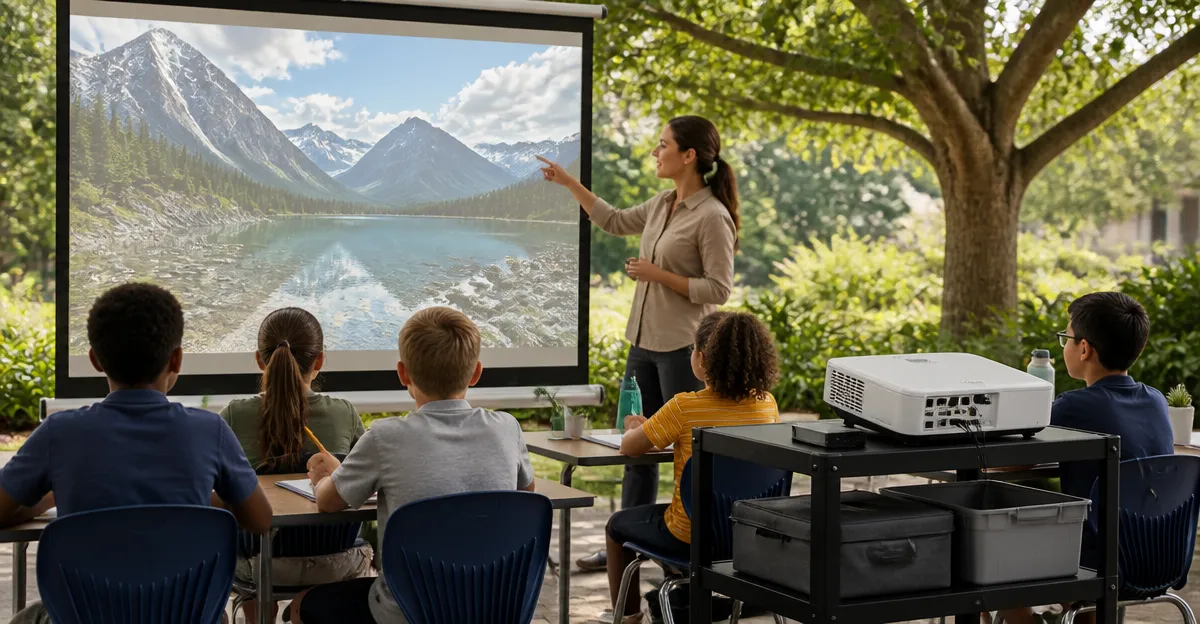
Ultimate Guide to Outdoor Projector Classroom Kits for Community Programs: Setup, Gear, and Budget‑Friendly Tips
This guide explains how community organizers can assemble reliable outdoor projector kits that support educational presentations, movie nights, and interactive workshops. Readers will learn essential terminology, evaluate equipment options, compare key features, and follow practical tips for safe, repeatable installations.
Background and Context
Outdoor learning environments have grown in popularity because they encourage engagement, foster collaboration, and make use of public spaces such as parks, schoolyards, and community centers. Successful outdoor projection requires three core components: a light source capable of delivering a bright image, a screen that maintains image quality under ambient light, and a power solution that can operate safely away from permanent wiring. Understanding brightness measured in ANSI lumens, resolution standards such as 1080p and 4K support, and connectivity options (HDMI, Wi‑Fi, Bluetooth) is essential before selecting hardware.
Brightness is a critical factor; a projector rated at 600 ANSI lumens can produce a vivid picture in a dimly lit backyard, while a unit with 300 ANSI lumens may require a darker setting or a larger screen to appear clear. Resolution determines the level of detail; native 1080p delivers sharp text for classroom slides, whereas 4K support provides future‑proofing for high‑definition content. Connectivity determines how easily educators can stream lessons from a tablet, laptop, or streaming stick without additional adapters.
In addition to technical specifications, community programs must consider budget constraints, portability, and durability. Many organizations rely on volunteer staff, so equipment that is straightforward to set up and store will reduce the learning curve and increase program sustainability.
Key Components of an Outdoor Projector Kit
Projector Selection
Choosing a projector that balances brightness, resolution, and smart‑functionality is the first step. The WiMiUS P62 Pro Projector offers 600 ANSI lumens, native 1080p with 4K support, and built‑in streaming apps such as Prime Video and YouTube. Its dual HDMI ports, Wi‑Fi 6, and Bluetooth 5.2 enable versatile connections without external devices. Users have praised the auto‑focus and keystone correction, which simplify alignment on uneven outdoor surfaces.
For tighter budgets, the YGSKK Mini Projector provides 300 ANSI lumens, native 1080p, and compatibility with 4K sources via HDMI. It includes Wi‑Fi 6 and Bluetooth 5.3, a built‑in app store, and electric focusing that reduces manual adjustment time. While its brightness is lower than the WiMiUS model, it remains suitable for evening sessions when ambient light is limited.
Both devices carry strong user ratings (4.6/5.0 and 4.5/5.0 respectively) and include warranty coverage, which is valuable for programs that may experience occasional mishandling.
Screen Options
A high‑quality screen maximizes the projector’s image clarity. The XHYCPY Inflatable Movie Screen measures 16 feet diagonally, supports front and rear projection, and inflates in approximately two minutes using an included 110 V blower. Its thickened polyester material reduces color washout and the frame is made of durable 210D oxford cloth, which can be machine‑washed for easy maintenance.
For portable indoor or outdoor use where storage space is limited, the Mdbebbron 120" Foldable Screen offers a 120‑inch diagonal surface, anti‑crease fabric, and double‑sided projection capability. The screen folds into a compact package that fits into a backpack, making it ideal for pop‑up classrooms in parks.
The ZUVMITG 120" Stand Screen combines a sturdy steel frame with a wind‑proof kit (stakes, ropes, sandbags) for outdoor stability. Its milk‑silk fabric delivers 4K HD visuals and a 160° viewing angle, ensuring that participants seated at various positions receive a clear picture.
Audio Considerations
Clear audio is essential for instructional clarity. The WiMiUS projector includes dual 10 W Hi‑Fi speakers with Dolby processing, which can serve small group sessions without additional equipment. For larger gatherings, the projector’s Bluetooth 5.2 capability allows connection to external speakers or soundbars, extending the audio range.
The YGSKK Mini Projector features high‑fidelity stereo speakers that are adequate for intimate indoor sessions. When outdoor volume is required, users can pair the device with Bluetooth‑enabled portable speakers, a common practice among community organizers.
Comparison and Selection Guide
| Feature | WiMiUS P62 Pro | YGSKK Mini | XHYCPY Inflatable Screen | Mdbebbron Foldable Screen | ZUVMITG Stand Screen |
|---|---|---|---|---|---|
| Brightness (ANSI lumens) | 600 | 300 | N/A | N/A | N/A |
| Resolution | Native 1080p, 4K support | Native 1080p, 4K compatible | N/A | 120" 16:9, 1080p support | 4K HD (milk silk fabric) |
| Connectivity | 2 HDMI, 2 USB, Wi‑Fi 6, Bluetooth 5.2 | HDMI, USB, Wi‑Fi 6, Bluetooth 5.3 | Front/Rear projection, 110 V blower | Hooks, rope, double‑sided support | HDMI, USB, optional audio inputs |
| Portability | Medium (no carry case) | High (compact) | High (inflatable, includes carry bag) | Very high (folds into backpack) | Medium (stand with bag) |
| Price (USD) | 196.93 | 75.99 | 98.99 | 24.99 | 59.99 |
| Average Rating | 4.6/5 (5,187 reviews) | 4.5/5 (4,453 reviews) | 4.6/5 (2,199 reviews) | 4.5/5 (39,903 reviews) | 4.3/5 (630 reviews) |
When budgeting for a complete kit, the combination of the YGSKK Mini Projector (75.99) with the Mdbebbron Foldable Screen (24.99) yields a total cost under $110, suitable for small‑scale programs that operate after sunset. For larger audiences, pairing the WiMiUS P62 Pro (196.93) with the XHYCPY Inflatable Screen (98.99) provides higher brightness and a 16‑foot viewing surface, bringing the total to approximately $295.
Programs that anticipate windy outdoor conditions should prioritize the ZUVMITG Stand Screen, as its reinforced base and wind‑proof accessories reduce the risk of collapse. Although its price is modest ($59.99), the added stability can prevent costly interruptions.
Best Practices and Tips for Community Programs
- Plan for Power. Use outdoor‑rated extension cords with surge protection. If a generator is required, select one with at least 500 W capacity to accommodate the projector and blower simultaneously.
- Control Ambient Light. Schedule screenings after sunset or use blackout curtains if the event takes place under a pavilion. The WiMiUS P62 Pro’s HDR10 support helps preserve contrast in moderately lit environments.
- Secure the Screen. For inflatable screens, zip the enclosure before inflation and position the blower away from walls to minimise acoustic reflection. For stand screens, stake the base and add sandbags as recommended by the manufacturer.
- Test Connectivity in Advance. Verify Wi‑Fi signal strength at the chosen location. The WiMiUS and YGSKK projectors both support Wi‑Fi 6, which provides better stability in crowded networks.
- Use Auto‑Focus and Keystone Features. Modern projectors such as the WiMiUS P62 Pro and YGSKK Mini include automatic focus and keystone correction, reducing setup time and ensuring a rectangular image even on uneven surfaces.
- Prepare Backup Audio. Bring a portable Bluetooth speaker with at least 10 W output for larger groups. Pairing is quick, and the WiMiUS projector’s ARC HDMI port simplifies integration with external soundbars.
- Document the Setup. Capture photos of cable routing, screen tension, and power placement. This documentation helps volunteers replicate the configuration for future events.
Frequently Asked Questions
What is the minimum brightness required for outdoor daytime presentations?
For daytime use under direct sunlight, a projector with at least 2,500 ANSI lumens is recommended. The devices featured in this guide are optimized for evening or shaded‑area use, where 300‑600 lumens provide clear images.
Can the inflatable screen be used for rear projection?
Yes, the XHYCPY Inflatable Screen is designed for both front and rear projection, offering a 160° viewing angle that maintains image quality on either side.
Is a separate sound system necessary?
If the audience exceeds ten participants or the event takes place in an open field, an external Bluetooth speaker or soundbar will improve intelligibility. The built‑in speakers of the WiMiUS and YGSKK models are sufficient for small groups.
How portable are the foldable screens?
The Mdbebbron 120" Foldable Screen folds into a compact package that fits into a standard backpack, making it ideal for programs that travel between multiple sites.
What warranty coverage is offered?
WiMiUS provides a 2‑year money‑back guarantee, 3‑year repair coverage, and lifetime technical support. YGSKK includes a three‑year warranty with 24/7 technical assistance. Other manufacturers typically offer one‑year limited warranties.
Do I need a separate streaming device?
The WiMiUS P62 Pro and YGSKK Mini Projector include built‑in app stores with access to Prime Video, YouTube, and Hulu, eliminating the need for external streaming sticks.
Conclusion
Creating an outdoor projector classroom kit for community programs does not require extravagant spending. By understanding brightness, resolution, and connectivity, organizers can match equipment to the size of the audience and the lighting conditions of the venue. The WiMiUS P62 Pro Projector paired with the XHYCPY Inflatable Screen offers a premium experience for larger gatherings, while the YGSKK Mini Projector combined with the Mdbebbron Foldable Screen delivers a cost‑effective solution for smaller groups. Following the best‑practice checklist ensures safe, repeatable setups that maximize educational impact.
Products Featured in This Guide
WiMiUS P62 Pro Projector
Price: $196.93 | Rating: 4.6/5 (5,187 reviews)
Featured for its 600 ANSI lumens, auto‑focus, dual HDMI ports, and built‑in streaming apps, making it a versatile core for outdoor classroom kits.
XHYCPY Inflatable Screen
Price: $98.99 | Rating: 4.6/5 (2,199 reviews)
Featured for its 16‑foot diagonal size, front/rear projection capability, and rapid inflation, providing a large, durable surface for community movie nights.
Mdbebbron 120" Foldable Screen
Price: $24.99 | Rating: 4.5/5 (39,903 reviews)
Featured for its lightweight, anti‑crease fabric and 120‑inch viewing area, ideal for portable indoor and outdoor educational setups.
YGSKK Mini Projector
Price: $75.99 | Rating: 4.5/5 (4,453 reviews)
Featured for its compact size, 300 ANSI lumens, Wi‑Fi 6, Bluetooth 5.3, and electric focusing, offering an affordable entry point for small‑scale outdoor learning.
ZUVMITG 120" Stand Screen
Price: $59.99 | Rating: 4.3/5 (630 reviews)
Featured for its reinforced steel base, wind‑proof accessories, and 4K HD milk‑silk fabric, delivering stability and high‑definition visuals for outdoor events.